
TL;DR
The traditional rule that building is always cheaper has flipped. Now, buying a prebuilt can save time, reduce risk, and sometimes even cut costs, especially with recent component price spikes. Your choice depends on your control needs, budget, and how quickly you want to deploy.
Imagine finally getting that AI workstation up and running — and realizing it took twice as long and cost twice as much as you expected. It’s a familiar story, but the game has shifted. Building your own system used to be cheaper, but recent market chaos has flipped that script. It’s a familiar story, but the game has shifted. Building your own system used to be cheaper, but recent market chaos has flipped that script. Now, the decision isn’t just about saving money; it’s about speed, support, and control.
If you’re eyeing a high-powered AI rig, understanding whether to build or buy could save you months of frustration or thousands of dollars. This article breaks down the real trade-offs in 2026, based on current market dynamics and what you actually need from your machine.
Build vs buy
an AI workstation.
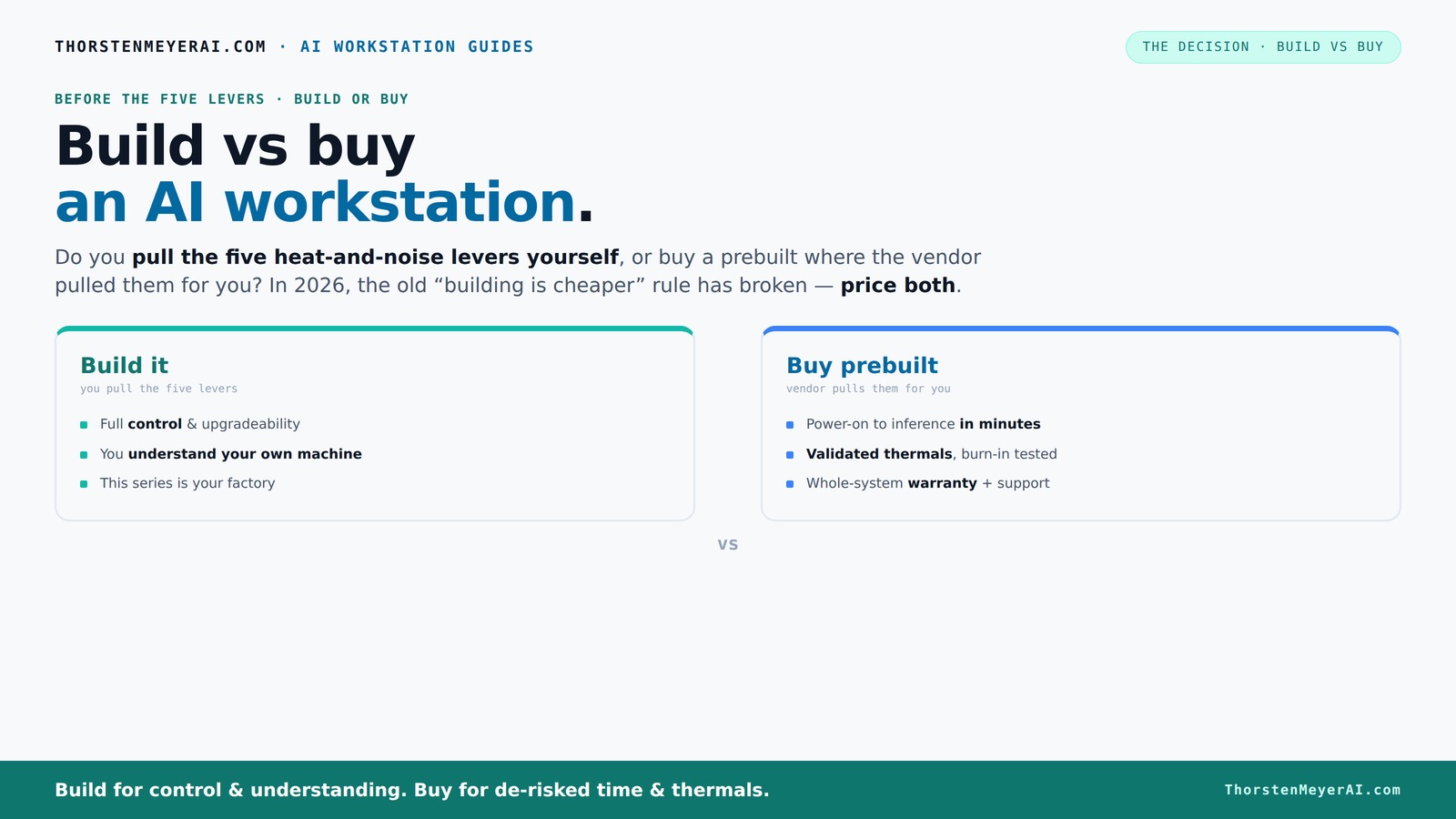
The real question behind this whole series: do you pull the five heat-and-noise levers yourself, or buy a prebuilt where the vendor pulled them for you? And in 2026, the old “building is cheaper” rule has broken. Match your situation in Part 3.
Key Takeaways
- Component shortages and market spikes make prebuilt AI workstations often cheaper and faster to deploy in 2026.
- Thermal management is the core of high-performance AI systems — prebuilt vendors handle this, while DIY allows precise control.
- The true cost isn't just upfront — support, maintenance, and downtime heavily influence the total cost of ownership.
- Speed to deployment favors buying; customization and control favor building, but market conditions now blur that line.
- Hybrid solutions, buying the base and upgrading selectively, are increasingly common and flexible.
high performance AI workstation prebuilt
As an affiliate, we earn on qualifying purchases.
As an affiliate, we earn on qualifying purchases.
Why the old rule — build cheaper than buy — no longer holds in 2026
Once, building your own AI workstation was a no-brainer for saving cash. But in 2026, the market has changed. Component shortages and price spikes for GPUs, RAM, and SSDs mean a DIY build often costs more than a prebuilt. For example, a DIY system that used to cost $1,000 now easily hits $1,250 or more, thanks to inflated component prices and shipping delays.
Meanwhile, major vendors like Lambda and Puget Systems bought components in bulk before the shortages hit, allowing them to keep prices competitive. Some prebuilt systems are now priced similarly or even lower than assembling your own, with the added benefit of validation and support. The old mantra of ‘build cheap, buy expensive’ no longer applies — now, you need to price both options carefully.
More importantly, this shift has significant implications for decision-making. When DIY becomes more expensive and complicated, the advantage of customization diminishes if it comes at a higher cost or longer lead times. Conversely, prebuilt systems, benefitting from economies of scale and supply chain management, can offer reliable, ready-to-deploy solutions. This change forces a reevaluation of cost and risk, emphasizing the importance of comprehensive total cost analysis rather than just initial expenses.
customizable AI workstation build kit
As an affiliate, we earn on qualifying purchases.
As an affiliate, we earn on qualifying purchases.
The five levers: who pulls the heat, noise, and performance strings?
Think of a high-performance AI workstation as a furnace. It’s about managing heat, noise, and stability — and that’s where the real expertise happens. The five levers are undervolting the GPU, matching the cooling system, optimizing airflow, tuning fans, and strategic placement.
If you buy prebuilt, the vendor pulls these levers for you. They validate thermals, tune fans, and often include water cooling for quieter, cooler operation. For example, BIZON systems boast up to 30% lower noise levels thanks to factory-tuned cooling. You pay for this engineering, but you skip the trial-and-error.
Building your own? You get to choose every component — from a quiet GPU like the NVIDIA RTX 4090 with a custom fan curve, to a case with sound-dampening panels. It’s an ongoing process. You learn to tune these levers yourself, gaining control but also taking on the responsibility of maintaining thermal performance.
Why does this matter? Thermal management directly impacts system stability, longevity, and performance in AI workloads. Poor cooling can lead to thermal throttling, reducing your GPU and CPU performance under load, which in turn hampers your AI workloads. Conversely, over-engineering cooling solutions can add unnecessary cost and noise. Striking the right balance is essential, and understanding these levers helps you make informed choices whether building or buying. The ability to fine-tune thermals can also extend the lifespan of your components, ensuring your investment remains effective over several years, especially critical in high-demand AI tasks where hardware longevity matters.
professional GPU for AI training
As an affiliate, we earn on qualifying purchases.
As an affiliate, we earn on qualifying purchases.
Speed vs control: what you gain and lose with each option
| Build | Buy |
|---|---|
| Custom parts selection, tailored cooling, and upgrade paths. You control every detail, allowing optimization for specific workloads and future expansion. | Plug-and-play convenience. The vendor pre-optimizes thermals, noise, and stability, so you’re up and running faster, with less technical effort. |
| Weeks to months for assembly, testing, and troubleshooting, especially if issues arise or parts are backordered. | Systems arrive ready to deploy in days or weeks, often with preinstalled software, validated configurations, and dedicated support channels, reducing setup time and risk. |
For example, a startup with a tight deadline might prefer a prebuilt to skip the weeks of assembly and troubleshooting, ensuring they meet project timelines. On the other hand, a research lab requiring a highly specific configuration might opt to build, accepting the longer lead time to achieve precise hardware matching their unique workflows. This trade-off highlights how control and speed are often inversely related, and your choice should align with your operational priorities and risk tolerance.
enterprise AI workstation prebuilt
As an affiliate, we earn on qualifying purchases.
As an affiliate, we earn on qualifying purchases.
Total cost of ownership: more than just the sticker price
Buying a system isn’t just about the initial price — it’s about what it costs over three years. Support, warranty, downtime, upgrades, and maintenance all add up. A prebuilt often includes a warranty of 3–5 years, with support that covers hardware failures and troubleshooting. That means less headache and less downtime.
Building your own? You own the support and maintenance. If something breaks, you fix it yourself or pay for repairs. Over time, those hidden costs — time spent troubleshooting, parts replacements, and potential delays — can tip the balance against DIY in many scenarios. Moreover, support services provided by vendors can include proactive monitoring, firmware updates, and on-site repairs, which can significantly reduce unexpected downtime and extend the useful life of your system. These factors can translate into substantial savings and productivity gains, especially critical in enterprise or research environments where system availability is paramount.
Understanding total cost of ownership helps you evaluate whether the initial savings of DIY are offset by ongoing expenses and risks. In many cases, the peace of mind and operational continuity offered by vendor support justify the higher upfront cost, especially when system uptime directly impacts project timelines and revenue.
When does building make sense — and when does buying win?
Building makes sense if you enjoy tuning hardware, want a highly customized setup, or have unique workflow needs. If you’re a hobbyist or a team with in-house expertise, DIY can deliver the exact performance you need. For example, a university lab might build a rig with a custom cooling loop and specific GPU choices to match their research focus. The tradeoff here is greater control and potential long-term savings if you can optimize and maintain the system effectively.
Buying is best when you need fast deployment, reliable support, and validated thermals. Large teams or enterprises often prefer prebuilt because it reduces risk, accelerates time-to-value, and minimizes the technical burden on internal staff. For example, a startup needing to launch a model training project within a month might choose a prebuilt system to avoid delays and focus on core development. The key is balancing your technical capacity, timeline, and operational risk — choosing the approach that aligns with your strategic priorities.
Common pitfalls to avoid
- Overbuying CPU or GPU power — more isn’t always better if it causes thermal issues or doesn’t match your workload. Overspecifying can lead to unnecessary costs and cooling challenges that reduce system stability and lifespan.
- Ignoring future upgrade paths — choose a case and motherboard that can handle your anticipated expansion, including additional GPUs, RAM, or storage, to avoid costly replacements down the line.
- Confusing gaming parts with workstation-class components — they often don’t deliver the reliability or thermal performance needed for AI workloads, risking system crashes or hardware failure.
- Underestimating cooling and power requirements — a 300W GPU needs a robust PSU and airflow. Failing to account for these can cause thermal throttling, system instability, or hardware damage, especially under sustained AI compute loads.
For example, choosing a GPU with 24GB VRAM is great for large models, but if your case can’t dissipate heat effectively, it might throttle or fail prematurely, leading to costly downtime and hardware replacement.
Who should buy, who should build, and who should hybridize?
Solo creators and small teams often lean toward buying prebuilt for speed and simplicity. Large organizations or those with specific needs might prefer building or hybrid solutions. For instance, a research group might buy a robust prebuilt for core work but upgrade key components like GPUs later to meet evolving demands.
Hybrid approaches are increasingly popular: buy a solid base system, then customize or upgrade critical parts. This approach offers a balance, allowing rapid deployment with room for future upgrades without starting from scratch. For example, purchasing a prebuilt system and swapping in a quieter CPU cooler or additional RAM later can extend the system’s lifespan and adapt to changing needs, providing a flexible middle ground that combines the benefits of both approaches.
Frequently Asked Questions
Is it cheaper to build or buy a prebuilt AI workstation?
In 2026, component shortages and bulk buying have made prebuilt systems often as affordable or even cheaper than DIY builds. The total cost depends on your specific configuration, support needs, and how much time you spend on assembly and troubleshooting.What hidden costs should I expect if I build one myself?
Expect to spend extra on troubleshooting, thermal tuning, power supplies, and potential upgrades. Plus, consider the time you’ll spend sourcing parts, assembling, and maintaining the system — those hidden labor costs can add up quickly.How much faster is a prebuilt workstation to deploy?
Prebuilt systems typically arrive ready to run in days or weeks, while DIY builds can take months depending on complexity and availability. In 2026, quick deployment often tips the scales toward buying, especially under tight deadlines.When does building become worth it?
Building makes sense when you need a highly customized configuration, enjoy hardware tuning, or want to extend your system’s upgradeability. If control and long-term flexibility matter more than speed, DIY could be the better choice.Will a prebuilt machine limit future upgrades?
It depends. Some prebuilt systems are designed with upgrade paths in mind, but others may have limited PCIe slots or power capacity. Always check the motherboard and chassis specs before buying, especially if future expansion is a priority.Conclusion
In 2026, the choice between build and buy isn’t just about saving a few dollars. It’s about how quickly you want to get your AI projects off the ground, how much control you need, and how you manage risk. Sometimes, paying a little extra for a prebuilt’s validated thermals and support makes the most sense.
But if you love hardware tinkering or have unique demands, building remains a rewarding challenge. The smart move? Assess your workload, timeline, and support needs — then pick the approach that matches your mission. After all, your AI workstation isn’t just a box — it’s your gateway to the future.